Hotel Website Template
Best for hosts who want bookings without a booking engine
One-page template for hotels, guesthouses, and Airbnb hosts. Rooms, photos, amenities, and a booking call-to-action on a single page.
- hotel
- airbnb
- guesthouse
- booking
- hospitality
$49one-time · yours to edit in Carrd
Don't want to touch it? I'll build it and keep it running. Build it for me →
The service is top-notch. He cares about making sure you're happy with your purchase. He even helps you to work out any kinks so your website can shine.
 Erica
EricaOne page for a hotel, guesthouse or Airbnb host who wants reservations without paying for a booking engine. Rooms, amenities, photos, guest reviews and a reservation request — in the order a guest decides.
Who this template is for
Independent hotels, B&Bs, guesthouses and hosts with a handful of rooms. If guests currently book by phone, email, or through a platform that takes 15%, this page gives them a direct way in.
It is not a booking system. It does not hold availability or take payment. It gets the request into your inbox — or links out to wherever you already take bookings.
What’s included
Nine sections and a lot of room for photos — the demo carries 36.
Navigation
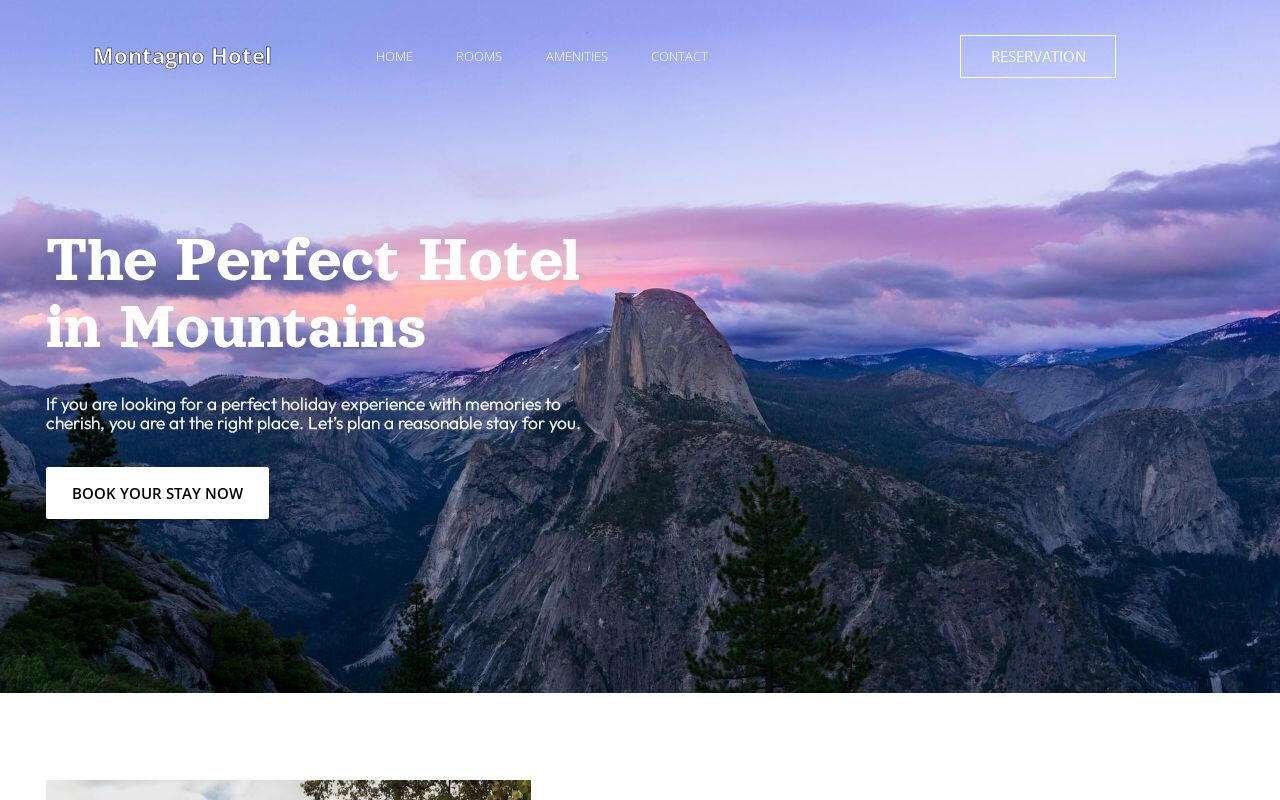
Hotel name and five links: Home, Rooms, Amenities, Contact, Reservation.
Hero
Full-width photo, headline, a three-line welcome and a “Book your stay now” button.
Introduction
A paragraph on the location and what makes the stay worth it, with a “Know more” link.
Experience block
Headline and one paragraph on the feel of the place — the section that sells a mood, not a room.
Amenities and facilities
Three highlight cards — the demo uses pool, spa, restaurant — each with a photo, two lines and a link. A second amenities block lower down lists the smaller perks.
Photo gallery
“Our inside pictures” — the grid where most of the 36 images live.
Guest reviews
Four review cards with stars and names.
Rooms
Six room cards — name, two-line description, photo, link. Rename them, delete the ones you don’t have.
Reservation request
A short form — name, email, message — and a closing “Plan an unforgettable experience today” call to action.
How to customise it
- Buy it and copy it to your Carrd account. After purchase, click “Use this template” and it appears in your Carrd dashboard. Needs Carrd Pro Standard ($19/year).
- Replace the placeholder content. Every heading, line, image and link is editable in Carrd’s visual editor. No code. Six room cards and three amenity cards are the only things to count; everything else is one of each.
- Connect your domain and publish. Point your domain at Carrd, press publish, and the page is live. The Carrd guide covers domains, forms and SEO step by step.
What you get
- The complete one-page template, all nine sections, ready to edit
- Room, amenity and review cards you duplicate or delete to match the property
- A mobile-first layout, 36 images included
- Every Carrd Pro feature: forms, embeds, custom domain, analytics
- No cost after Carrd Pro — no booking-engine fee, no commission
- 1 month of email support — content setup, connecting your domain, wiring your email service
Frequently asked questions
Do I need a Carrd Pro account?
Yes. Carrd Pro Standard ($19/year) or higher is required to use a custom template and connect your own domain. It is one of the lowest hosting costs of any website platform.
Can it take real bookings?
Not on its own — it has no calendar or payment. The reservation form emails you the request. If you use Booking.com, Airbnb or a channel manager, point the “Book your stay” button at that page instead.
I have three rooms, not six. Does it still work?
Yes. Delete three room cards. The grid reflows.
What does the 1 month of email support include?
Help getting your content into the template, connecting your domain, and integrating your email service — Kit, Mailchimp, Beehiiv and 15+ others. Email [email protected] after purchase.
Ready to launch your site?
Get the template, then make it yours in Carrd.
Don't want to touch it? I'll build it and keep it running. Build it for me →