Hair Salon
Best for hair salons that want services, team and a Book Now button on one page
One-page template for hair salons and beauty studios. Service list, team, gallery and a Book Now button that links to your booking page.
- hair salon
- beauty
- local business
- small business
- service list
$49one-time · yours to edit in Carrd
Don't want to touch it? I'll build it and keep it running. Build it for me →
The service is top-notch. He cares about making sure you're happy with your purchase. He even helps you to work out any kinks so your website can shine.
 Erica
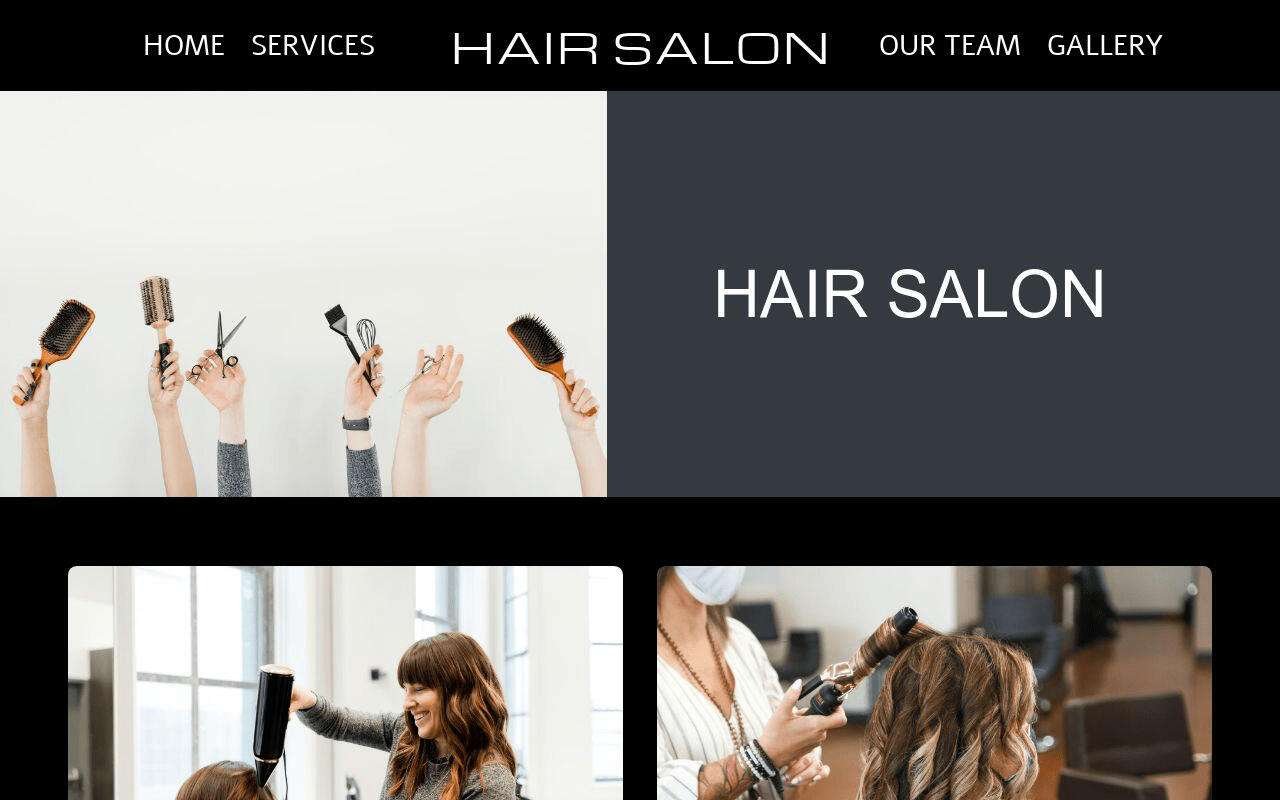
EricaOne page for a hair salon. The service list sits in a four-column table with a Book Now button under it; the team and the gallery follow.
Who this template is for
Hair salons and beauty studios with a team and a list of services. Your visitor wants to know three things: what you do, who will do it, and how to book.
It has no booking system and no contact form. “Book Now” is a button that links to a page you choose, such as your booking tool. Your phone number and email sit at the bottom of the page.
What’s included
Eight sections and 11 image slots, four of them in the gallery.
Navigation
Your salon name in the centre, with four links around it: Home, Services, Our Team, Gallery.
Hero
One large photo and the salon name.
What we do
A headline, one paragraph and a photo.
How we are different
A photo, a headline and one paragraph.
Our services
A one-line intro, a photo, and a table with four columns: Color & gloss, Haircut & styling, Highlights, Treatments. The demo lists 22 services, from “Walk-in Haircut” to “Keratin Treatment” and “Balayage”. The Book Now button sits under the table.
Our team
Three team members, each with a photo, a name and a role. The demo shows a hair stylist, a hairdresser and a make-up artist.
Our work
A gallery of four photos. Each one links to its full-size version.
Contact footer
Links to Facebook, Twitter, Instagram and YouTube, then your address, email and phone number.
How to customise it
- Buy it and copy it to your Carrd account. After purchase, click “Use this template” and it appears in your Carrd dashboard. Needs Carrd Pro Standard ($19/year).
- Replace the placeholder content. Every heading, line, image and link is editable in Carrd’s visual editor. No code. Point the Book Now button at your booking page before you publish: in the demo it links to a placeholder address.
- Connect your domain and publish. Point your domain at Carrd, press publish, and the page is live. The Carrd guide covers domains, forms and SEO step by step.
What you get
- The complete one-page template, all eight sections, ready to edit
- 11 image slots, including a four-photo gallery of your own work
- A service table you edit as text
- Every Carrd Pro feature: forms, embeds, custom domain, analytics
- No cost after Carrd Pro: no plugins, no hosting bill
- 1 month of email support: content setup, connecting your domain, wiring your email service
Frequently asked questions
Do I need a Carrd Pro account?
Yes. Carrd Pro Standard ($19/year) or higher is required to use a custom template and connect your own domain. It is one of the lowest hosting costs of any website platform.
Does it take bookings?
Not by itself. Book Now is a link. Point it at the booking tool you already use, or at a phone or email link.
Can I show prices in the service table?
The demo table lists service names only. The table is plain text in the Carrd editor, so you can type a price next to each service.
What does the 1 month of email support include?
Help getting your content into the template, connecting your domain, and integrating your email service: Kit, Mailchimp, Beehiiv and 15+ others. Email [email protected] after purchase.
Ready to launch your site?
Get the template, then make it yours in Carrd.
Don't want to touch it? I'll build it and keep it running. Build it for me →