
SaaS Landing Page Templates
In the competitive Software as a Service (SaaS) world, your landing page is often the first point of contact between your product and potential customers. It's a critical piece of digital real estate that can make or break your conversion rates.
This selection of SaaS landing pages will dive deep into what makes a SaaS landing page effective and the key elements that transform casual visitors into engaged users.
SaaS Landing Page Templates for Carrd
Landing Pages Explained
What is a SaaS Landing Page? A SaaS landing page is a standalone web page designed to convert visitors into leads or customers for a software service. Unlike a typical website homepage, a landing page has a singular, focused objective: to persuade visitors to take a specific action, such as signing up for a free trial, requesting a demo, or purchasing a subscription.
SaaS Landing Page Components:
- Highly targeted and focused on a single value proposition
- Minimalistic design that guides the visitor's attention
- Clear and compelling call-to-action (CTA)
- Designed to address specific customer pain points
- Optimized for quick comprehension and conversion
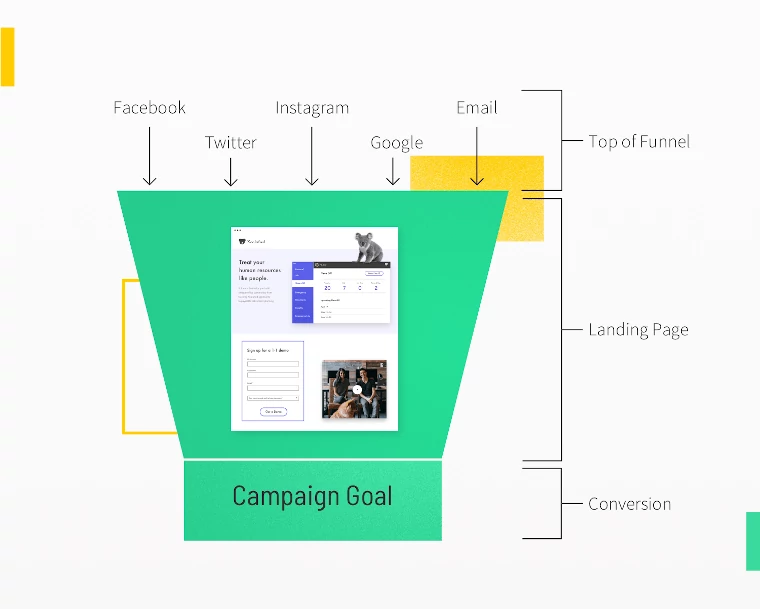
What does a landing page need to include
1. Powerful Headline and Subheadline
Your headline is the first thing visitors see, and it needs to communicate immediately:
- The unique value of your software
- How it solves a specific problem
- The benefit to the user
A strong subheadline should provide additional context and reinforce the headline's message, giving visitors a reason to keep reading.
2. Compelling Value Proposition
A successful SaaS landing page clearly articulates:
- What makes your solution unique
- How it differs from competitors
- The specific problems it solves
- The tangible benefits users will experience
Use concise, benefit-driven language that speaks directly to your target audience's needs and challenges.
3. Engaging Visual Elements
Visual communication is crucial in SaaS landing pages:
- Product screenshots or screen recordings
- Animated GIFs demonstrating key features
- Infographics explaining complex processes
- Clean, professional design that reflects your brand
- Visuals should clarify instantly how your software works and its core benefits.
4. Social Proof and Credibility Boosters
Building trust is essential for converting visitors:
- Customer testimonials
- Case studies
- Client logos
- Number of users or successful implementations
- Awards or industry recognition
- Trust badges and security certifications
5. Clear and Prominent Call-to-Action (CTA)
Your CTA is the most critical conversion element:
- Use action-oriented, benefit-driven language
- Make the button stand out with contrasting colors
- Place CTAs strategically throughout the page
- Offer low-friction conversion paths (free trial, demo)
Examples of effective CTA text:
- "Start Your Free Trial"
- "See How It Works"
- "Get Instant Access"
- "Solve [Problem] Now"
6. Feature Highlights
While focusing on benefits, provide clear information about key features:
- Use concise, scannable descriptions
- Highlight unique capabilities
- Show how features translate to user benefits
- Consider using icons or illustrations
7. Pricing Information
Transparency builds trust. Consider including:
- Pricing tiers
- Feature comparisons
- Flexible billing options
- No-commitment trial periods
- Money-back guarantees
8. Minimal Form Design
When requesting user information:
- Ask for only essential details
- Keep form fields to a minimum
- Use inline validation
- Communicate the value exchange
- Ensure the form is mobile-responsive
9. Mobile Responsiveness
With increasing mobile traffic:
- Ensure seamless experience across devices
- Optimize loading speed
- Maintain readability on smaller screens
- Simplify navigation and interactions
Best Saas Landing Pages Reviewed
This thread by Olly discusses insights gained from reviewing 200 SaaS landing pages over 2021. He highlights @popdotwork as the best example, noting its focus on benefits, clear call-to-action, and effective use of social proof.
What is the Average Cost of a SaaS Landing Page
The cost of a landing page can vary widely depending on several factors:
DIY/Template Options:
- Free to $200: Using SaaS Landing Page builders like Unbounce, Leadpages, or Carrd.
- Low-cost WordPress themes: $30-$100
- Boilerplates like ShipFa.st
Freelance Designers:
- Basic landing page: $300-$800
- Mid-range design with custom graphics: $800-$1,500
- Professional, conversion-optimized page: $1,500-$3,000
Web Design Agencies:
- Small agencies: $1,500-$5,000
- Mid-tier agencies: $5,000-$10,000
- Enterprise-level designs: $10,000-$25,000
Factors Affecting Price:
- Complexity of design
- Number of revisions
- Custom illustrations/graphics
- Copywriting
- A/B testing capabilities
- Responsive design
- Integration requirements
Ongoing Costs:
- Hosting: $10-$50/month
- Maintenance: $50-$200/month
- Conversion optimization: $500-$2,000 per month
Most small to medium businesses typically spend between $500-$3,000 for a professionally designed, conversion-focused landing page.
The key is finding the right balance between cost, design quality, and potential conversion impact.
Conclusion
A high-converting SaaS landing page is a strategic blend of compelling copywriting, design, and user psychology. By focusing on clear communication, building trust, and making conversion effortless, you can transform your landing page into a powerful customer acquisition tool.
Continuous testing and optimization are key to improving your landing page's performance. Regularly analyze user behavior, conduct A/B tests, and iterate based on data-driven insights.